❤️ Support This Project
hetzner-k3s is maintained by a single developer. If it saves you time or money, please consider sponsoring its continued development.
The easiest and fastest way to create production-ready Kubernetes clusters on Hetzner Cloud

Table of Contents
- Why hetzner-k3s?
- Why Hetzner Cloud + k3s?
- What Gets Installed
- Quick Start
- Who Uses hetzner-k3s?
- How It Compares
- Key Features
- Documentation
- Who am I?
- Sponsors
- Contributing
- License
Why hetzner-k3s?
hetzner-k3s is a CLI tool that creates production-ready Kubernetes clusters on Hetzner Cloud in minutes, not hours. No Terraform to learn, no management cluster required, no third-party access to your credentials.
Speed That Sets Records
- 3-node HA cluster in 2-3 minutes — masters, workers, networking, and essential components all configured
- 500-node cluster in under 11 minutes — tested with 3 masters and 497 workers (possibly a world record!)
Simplicity Without Compromise
- Single CLI tool — no Terraform, Packer, Ansible, or existing Kubernetes cluster required
- One YAML config file — human-readable configuration, version-controllable
- Batteries included — Cloud Controller Manager, CSI driver, System Upgrade Controller, and Cluster Autoscaler installed automatically
Complete Control, Zero Lock-in
- Your credentials stay local — Hetzner API token never leaves your machine
- No third-party access — unlike managed services, no one else can see your clusters or workloads
- Open source (MIT License) — inspect, modify, and contribute to the code
- No recurring platform fees — you only pay Hetzner for infrastructure
How It Works

No Terraform. No Packer. No Ansible. No management cluster. No third-party account. Your API token never leaves your machine.
Why Hetzner Cloud + k3s?
Hetzner Cloud: Exceptional Value
Hetzner Cloud offers the best performance-to-cost ratio in the industry:
- Up to 80% lower costs than AWS, Google Cloud, and Azure
- Transparent pricing — traffic, IPv4/IPv6, DDoS protection, and firewalls included
- Global presence — data centers in Germany (Nuremberg, Falkenstein), Finland (Helsinki), USA (Ashburn, Hillsboro), and Singapore
- Flexible instance types — x86 and ARM architectures, including cost-effective ARM instances (CAX) for budget-friendly clusters
- Proven reliability — trusted by companies worldwide for over 25 years
k3s: Lightweight Kubernetes
k3s by Rancher is a certified Kubernetes distribution optimized for resource efficiency:
- Lower resource footprint — uses less memory and CPU, leaving more for your workloads
- Single binary — fast to deploy and upgrade
- Production-ready — 99.8% successful automated updates in community benchmarks
Sample Monthly Costs
Real infrastructure costs for common cluster configurations (December 2025 pricing):
| Cluster Type | Configuration | Monthly Cost | |--------------|---------------|--------------| | Development | 1 master (CX23), 2 workers (CX23) | ~€16/month | | Small Production | 3 masters (CPX22), 3 workers (CPX32) | ~€58/month | | Medium Production | 3 masters (CPX22), 10 workers (CPX32) | ~€135/month | | Large Production | 3 masters (CPX42), 50 workers (CPX32) | ~€615/month |
Includes load balancer (~€5.50/month). No management fees, no per-user fees—just infrastructure.
Compare to managed alternatives:
- Equivalent AWS EKS: 3-5x higher infrastructure cost + $0.10/hour cluster fee (~$73/month)
- Managed Hetzner services (e.g. Cloudfleet): Infrastructure + platform fees that scale with cluster size and add up quickly
What Gets Installed
When you run hetzner-k3s create, you get a complete, production-ready cluster:
| Component | Purpose | |-----------|---------| | k3s | Lightweight Kubernetes distribution | | Hetzner Cloud Controller Manager | Automatic load balancer provisioning | | Hetzner CSI Driver | Persistent volumes via Hetzner block storage | | System Upgrade Controller | Zero-downtime k3s upgrades | | Cluster Autoscaler | Automatic node scaling based on demand |
All integrated with Hetzner's private networking and firewall. Traefik, ServiceLB, and metrics-server are available as optional add-ons.
Quick Start
1. Install hetzner-k3s
Homebrew (macOS/Linux):
brew install vitobotta/tap/hetzner_k3sLinux binary (amd64):
wget https://github.com/vitobotta/hetzner-k3s/releases/download/v2.6.0/hetzner-k3s-linux-amd64
chmod +x hetzner-k3s-linux-amd64
sudo mv hetzner-k3s-linux-amd64 /usr/local/bin/hetzner-k3s
See Installation Guide for all platforms.
2. Create a Configuration File
Create cluster.yaml:
hetzner_token: <your-token>
cluster_name: my-cluster
kubeconfig_path: "./kubeconfig"
k3s_version: v1.32.0+k3s1

networking:
  ssh:
    port: 22
    use_agent: false
    public_key_path: "~/.ssh/id_ed25519.pub"
    private_key_path: "~/.ssh/id_ed25519"
  allowed_networks:
    ssh:
      - 0.0.0.0/0
    api:
      - 0.0.0.0/0

masters_pool:
  instance_type: cpx22
  instance_count: 3
  locations:
    - fsn1
    - hel1
    - nbg1

worker_node_pools:
- name: workers
  instance_type: cpx32
  instance_count: 3
  location: hel1
See Creating a Cluster for a complete configuration example with all available options.
3. Create Your Cluster
hetzner-k3s create --config cluster.yamlIn 2-3 minutes, your cluster is ready. The kubeconfig is saved automatically.
export KUBECONFIG=./kubeconfig
kubectl get nodes
Who Uses hetzner-k3s?
- Startups running cost-efficient production workloads
- Development teams spinning up ephemeral test clusters
- Agencies and consultants deploying client infrastructure quickly
- Companies in regulated industries requiring data sovereignty
- Platform engineers who want simplicity without sacrificing control
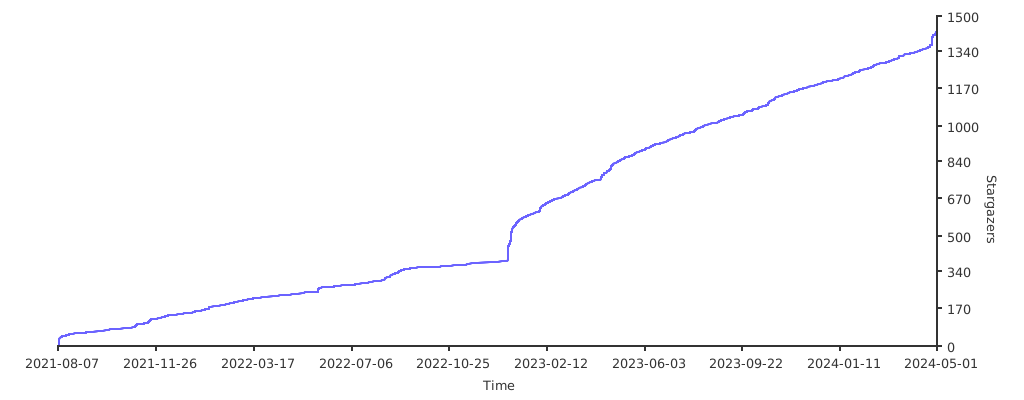
Join an active community with 3,100+ GitHub stars and regular contributions.
How It Compares
| Factor | hetzner-k3s | Managed Services | Terraform-based | |--------|-------------|------------------|-----------------| | Setup time | 2-3 minutes | 5-10 minutes | 15-30+ minutes | | Dependencies | CLI tool only | Third-party account* | Terraform, Packer, HCL knowledge | | Data privacy | Full control | Third-party access | Full control | | Monthly cost | Infrastructure only | Infrastructure + platform fees | Infrastructure only | | Credential exposure | None | API tokens to third party | None | | Learning curve | Low | Low | Medium-High |
*Managed services (Cloudfleet, Edka, etc.) require signing up for their platform in addition to Hetzner Cloud.
For a detailed comparison, see Why hetzner-k3s Stands Out.
Key Features
High Availability
Deploy masters and worker pools across multiple locations for regional resilience.
Autoscaling
Define min/max instances per node pool. The Cluster Autoscaler handles the rest.
worker_node_pools:
- name: autoscaled
  instance_type: cpx32
  location: fsn1
  autoscaling:
    enabled: true
    min_instances: 1
    max_instances: 10
Multiple Node Pools
Mix instance types and locations for different workloads. Hetzner offers x86 and ARM instances at various performance levels—including cost-effective ARM instances (CAX) ideal for budget-friendly clusters.
Private Networking
Cluster communication over Hetzner's private network by default.
CNI Options
Choose Flannel (simple) or Cilium (advanced networking features).
Large Cluster Support
Tested with 500 nodes and designed to scale beyond. Clusters over 100 nodes require some configuration changes (see Recommendations).
Documentation
Full documentation: vitobotta.github.io/hetzner-k3s
- Installation
- Creating a Cluster
- Setting Up a Complete Stack
- Cluster Maintenance
- Recommendations for Production
- Troubleshooting
Who am I?
I'm Vito Botta, Lead Platform Architect at Brella, an event management platform based in Finland. I handle infrastructure, coding, and support for the development team.
I also spend time as a bug bounty hunter, finding and responsibly reporting security vulnerabilities.
Connect with me at vitobotta.com. I'm available for consultancies around hetzner-k3s and Kubernetes on Hetzner.
Why Sponsor?
This project is maintained by a single developer in my spare time. Sponsorship helps me:
- Respond to issues faster
- Ship new features regularly
- Keep the project compatible with new Hetzner Cloud updates
If hetzner-k3s saves you time or money, please consider supporting its development.
Diamond Sponsors

SprintPulse — the retrospective tool teams actually love. Run engaging retros with real-time collaboration, AI-powered insights, and actionable outcomes. Set up in 60 seconds, no training required.

A special thank you to Alamos GmbH for sponsoring the development of key features!
Bronze Sponsors

DevOps Squad — Deploying is easy; Day 2 is hard. Cut your AWS bill by 60% with fully-managed Hetzner infrastructure ($2,995/mo). Run the Cloud Exit Calculator to see your savings.
Backers
Thanks to @deubert-it, @mitja, @elderapo, @jonasbadstuebner, @ricristian, @mykongee, @mertcangokgoz, @QuentinFAIDIDE for their support!
Contributing
Contributions are welcome! See Contributing and Support for guidelines.
Code of Conduct
Everyone interacting in this project is expected to follow the code of conduct.
License
Open source under the MIT License.
Star History