MARKTerm

MARKTerm is a suite of tools to render Markdown anywhere, built on top of Markd:
marktermrenders Markdown to the terminal, with themes, images, and HTML-style links. Inspired by Glow.markpdfrenders Markdown to small, fast, self-contained PDF files.markmarkrenders Markdown to Markdown, for normalizing or filtering documents.
It can also be used as a Crystal library.
Features
- It will syntax highlight code blocks
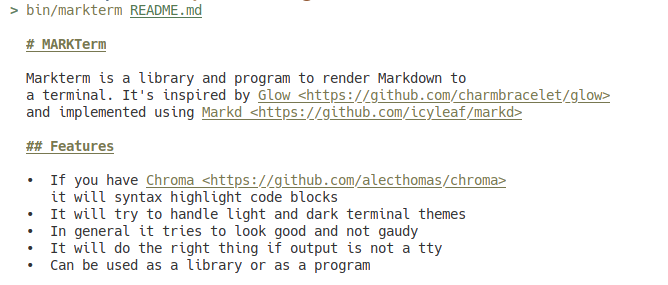
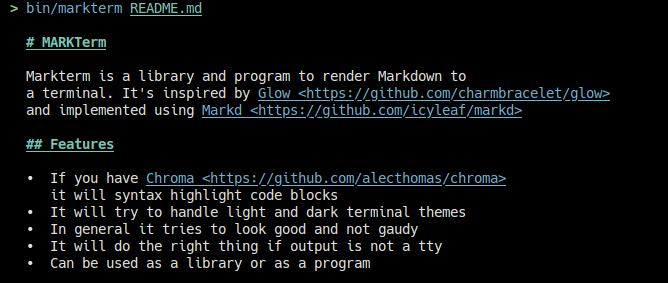
- It will try to handle light and dark terminal themes. Since it uses the terminal's colors, it should match things like vs code themes in the vs code terminal, etc.
- In general it tries to look good and not gaudy
- It will do the right thing if output is not a tty
- Optional hyphenation of long words when wrapping
(
--hyphenate, English or Spanish patterns) - Can be used as a library or as a program
TODO
Done recently (markpdf):
- ✅ Built-in stylesheets (default, book, dark, sepia) with
--style,--print-styleand repeatable--css - ✅ Pageless single-page output (
--pageless) - ✅ PDF outline bookmarks from headings
- ✅ Task-list checkboxes (☑/☐)
- ✅ Wide tables scale to fit and split across pages at row boundaries
- ✅ Collapse-style table borders and keep-with-next pagination
- ✅ Superscript and subscript via inline HTML
- ✅ Math: styled Unicode pass (always) + optional libtexprintf text art for display math (GPL build flag)
- ✅ Emoji and CJK rendering via font fallback (CID font embedding through a libharu patch)
- ✅ Richer header/footer templating:
left|center|rightsections via|, and a base-14 font fallback so headers and footers work even without embedded fonts
Done (markterm):
- ✅ Configurable themes
- ✅ Implement HTML-style links as supported in kitty/alacritty
- ✅ Don't break paragraphs on soft breaks
- ✅ Implement images as supported in kitty (requires timg, kinda buggy)
- ✅ Images in all terminals (requires catimg, kinda useless)
- ✅ Implement HTML block support
- ✅ Better textual image display when images are not supported
- ✅ Maybe only support timg with options
- ✅ Support being used in a pipeline
- ✅ Task lists, GFM alerts, wrapped tables
- ✅ Footnotes
- ✅ Wrap styled table cells at word boundaries when tables are squeezed
- ✅ Internal piping to $PAGER for tall documents (
--no-pageropts out) - ✅ CLI switches for images and links (
--images,--no-images,--no-links) - ✅ Color capability detection: NO_COLOR and colorless terminals get plain text with ATX heading hashes
Upstreaming
The forks and patches this suite carries are meant to shrink over time. These are the changes we want merged upstream; open pull requests are linked:
- markd: footnotes —
PR #78, open since
March 2025, awaiting review;
shard.ymlpins the PR branch - litehtml: clip-based subtree pruning in the draw walk — PR #485, in review; makes paginated drawing linear instead of quadratic
- litehtml:
get_row_boxes, the table-row box API markpdf needs to split tables at row boundaries — local-only commit on top of the #485 branch; goes upstream once it lands - libharu: cmap format 12 support and an alternate-CID encoder API, which together enable non-BMP glyphs (emoji) — currently a local patch applied at build time (ext/libharu-cid-fixes.patch); no PR yet
Usage as a program
Either get a static binary from the releases page or build from source:
- Install crystal
- Checkout the repo
- run
shards build
This is the help:
Markterm - A tool to render markdown to the terminal

Usage:
  markterm <file> [-t <theme>][--code-theme <code-theme>][-l][-c][-w <width>][--hyphenate][--language <language>][--images|--no-images][--no-links][--no-pager]
  markterm -h | --help
  markterm --version

Options:
  -h --help                  Show this screen.
  -t <theme>                 Theme to use for coloring output
  --code-theme <code-theme>  Theme to use for coloring code blocks
  --version                  Show version.
  -l                         Force html-like links
  --no-links                 Never emit html-like links
  -c --color                 Force color output even when piping
  -w <width>                 Maximum line width for text wrapping (0 to disable, auto-detects if not specified)
  --hyphenate                Break long words at syllable boundaries when wrapping
  --language <language>      Hyphenation language: en or es [default: en]
  --images                   Force images where the terminal can show them
  --no-images                Never draw images; show placeholders instead
  --no-pager                 Never pipe output to $PAGER

If you use "-" as the file argument, markterm will read from stdin.
There is a similar markmark binary that will render markdown to markdown.
markpdf
The markpdf binary renders markdown to PDF. It converts the markdown to
HTML with markd, lays it out with litehtml,
and writes the PDF through libharu,
via the C++ shim in ext/. Styling is CSS: markpdf ships a roster of
built-in stylesheets (pick one with --style), and you can add your own
rules on top with --css.
Markpdf - A tool to render markdown to PDF

  Usage:
    markpdf [<file>] [options]
    markpdf --list-styles
    markpdf -h | --help
    markpdf --version

Options:
  -h --help                  Show this screen.
  -t <theme>                 Theme to use for coloring output
  --code-theme <code-theme>  Theme to use for coloring code blocks
  --version                  Show version.
  -o <output>                Write the PDF to a file (defaults to standard output)
  --page-size <size>         Page size: a4 or letter [default: a4]
  --margin <margin>          Page margin in millimeters [default: 20]
  --style <style>            Built-in stylesheet setting layout and typography
                             (themes set colors instead): see --list-styles
                             [default: default]
  --list-styles              List the built-in stylesheets and exit
  --print-style              Print the built-in stylesheet named by --style to
                             standard output and exit
  --css <css>                Extra CSS file layered on top of the style; last
                             declaration wins (may be repeated)
  --pageless                 Single-page output: one page as tall as the document,
                             no headers/footers — good for on-screen reading,
                             wrong for printing. Very long documents scale down
                             to fit the PDF page-size limit.
  --font <font>              TTF font file to embed (can be repeated). Fonts are
                             matched by their internal family name; system fonts
                             are used automatically when available.
  --emoji-font <font>        TTF font used for emoji and symbols the main fonts
                             lack (auto-detected from system fonts by default)
    --header <header>          Page header text; "%p" is the page number, "%t" the
                               total page count. Split it with "|" into
                               left|center|right sections
    --footer <footer>          Page footer text; supports the same placeholders
                               and sections

If you use "-" as the file argument, markpdf will read from stdin.
Complete HTML documents (and .html files) are rendered directly,
skipping the markdown conversion.
Images are resolved relative to the input file's directory.
Styles
Built-in stylesheets set layout and typography; -t themes set colors.
The rendered stylesheet is layered style → theme → --css, each
later layer winning on equal specificity. --css may be repeated.
| style | look | |---------|-----------------------------------------------------| | default | clean sans-serif print style | | book | serif, justified, indented — long prose / e-readers | | dark | dark page, light text — screen reading | | sepia | warm paper tones, serif — e-reader default look |
See them, print one out, tweak it, and feed it back:
$ markpdf --list-styles
default  clean sans-serif print style (current)
book     serif, justified, indented — for long prose / e-readers
dark     dark page, light text — for screen reading
sepia    warm paper tones, serif — e-reader default look

$ markpdf --print-style --style book > my-book.css
$ $EDITOR my-book.css
$ markpdf book.md --style book --css my-book.css -o book.pdf
The dark style automatically uses a dark syntax-highlighting theme for
code blocks unless you pass --code-theme or -t explicitly.
For on-screen reading, --pageless skips pagination entirely: the
output is a single page as tall as the document (the --page-size
still sets its width, --margin the outer whitespace). Headers,
footers and page numbers do not apply in this mode. Documents longer
than the PDF page-dimension limit (14,400 pt ≈ 20 printed pages) are
scaled down uniformly — zoom in your viewer; text stays vector-crisp.
Math
Markdown math ($E = mc^2$ inline, $$…$$ display) is rendered as
styled Unicode: italic serif with real sub/superscripts and LaTeX
commands mapped to symbols (∫ ∑ ∞ π ± ≤ …). For display math you can
get true text-art rendering (integral signs with limits, fraction
bars) by enabling the optional GPL-3 libtexprintf
library — it lives in ext/libtexprintf as a git submodule:
git submodule update --init ext/libtexprintf
make -C ext WITH_TEXMATH=1
WITH_TEXMATH=1 shards build
Note the license trade-off: libtexprintf is GPL-3, and statically linking it makes the resulting markpdf binary effectively GPL-3. The default build does not use it, keeps your existing license, and renders math with the Unicode styling pass.
Text uses embedded TrueType fonts with full Unicode support: the shim
matches the CSS font-family names against the fonts you pass with
--font and against installed system fonts (/usr/share/fonts,
~/.fonts, ...), falling back to the PDF base-14 fonts for Latin text
when nothing matches.
Complete HTML documents are detected automatically and rendered directly — no markdown conversion — so markpdf doubles as a small HTML→PDF converter for the HTML subset litehtml supports.
Links pointing at http(s):// or mailto: URIs become clickable PDF
link annotations, and internal anchors (including footnote references
and their back-links) jump to their targets. Fenced code blocks get
tartrazine syntax highlighting (the docopt lexer included).
Example with a dark base16 theme, page numbers and a header:
markpdf notes.md -o notes.pdf -t "0x96f" --header "notes" --footer "%p / %t"Building markpdf from source requires libharu (pacman -S libharu,
apt install libharu-dev, ...) and a C++ toolchain: run make -C ext
once to build the shim, then shards build. See
BUILDING.md for all build modes — including the GPL-3
math build and the license-clean alternative — plus tests and static
release binaries.
markpdf-web
bin/markpdf-web (built alongside the other binaries) serves a small
Kemal site that doubles as markpdf's playground
and landing page: visitors edit markdown, tweak the styling knobs
(style, themes, page size, margins, headers, pageless, custom CSS),
and see the PDF update live.
bin/markpdf-web            # listens on :3000
PORT=8080 bin/markpdf-web  # or wherever you like
Documents live in the visitor's browser (localStorage) and in
shareable #d=... URLs; the server keeps nothing. Renders are
serialized through a mutex because the PDF shim is not known to be
thread-safe, so it is meant for demo traffic, not for heavy use.
Usage as a library
-
Add the dependency to your
shard.yml:dependencies: markterm: github: ralsina/markterm
In your code, use it like this:
  puts Markd.to_term(source)
  puts Markd.to_md(source)
The PDF side is a library too: Markd::Pdf::Renderer owns every
option as instance state, so instances are independent and reusable —
no global style accumulates between renders.
  require "markterm/pdf"

  renderer = Markd::Pdf::Renderer.new(style: "book",
    header: "notes", footer: "%p / %t")
  renderer.add_css(File.read("my-book.css"))
  pages = renderer.render(source, "book.pdf")

  # or one-shot, no instance to keep:
  Markd::Pdf.render(source, "out.pdf", style: "dark")
The only process-wide state is the font cache
(Markd::Pdf.register_font, Markd::Pdf.emoji_font=): parsed fonts
are cached for the life of the process because font metadata parsing
is expensive, and duplicate registrations are ignored.
Renderers are not thread-safe: litehtml and libharu make no thread-safety claims either. If several threads need to render, serialize the renders or use one process per worker.
Contributing
- Fork it (https://github.com/ralsina/markterm/fork)
- Create your feature branch (
git checkout -b my-new-feature) - Commit your changes (
git commit -am 'Add some feature') - Push to the branch (
git push origin my-new-feature) - Create a new Pull Request
Contributors
- Roberto Alsina - creator and maintainer